
Already have a script?
Start with an AI actor and your dialogue. Use this route when your product facts and message are already approved.
Prepare: one hook, one product detail, and one next action.
AI UGC creation with MagicActors
Create presenter-led product videos with an AI actor and a script. MagicActors also offers product-link and product-photo workflows for turning your offer into UGC-style ads.
HypeVideo is our video resource site. MagicActors is our creation app. Use the examples below to plan your video, then continue to MagicActors to create it.
Opens the MagicActors offer page. Video generation requires paid access.
Included creator tools with MagicActors paid access. Image and voiceover generation are subject to fair use; AI video generation uses your plan's allowance.
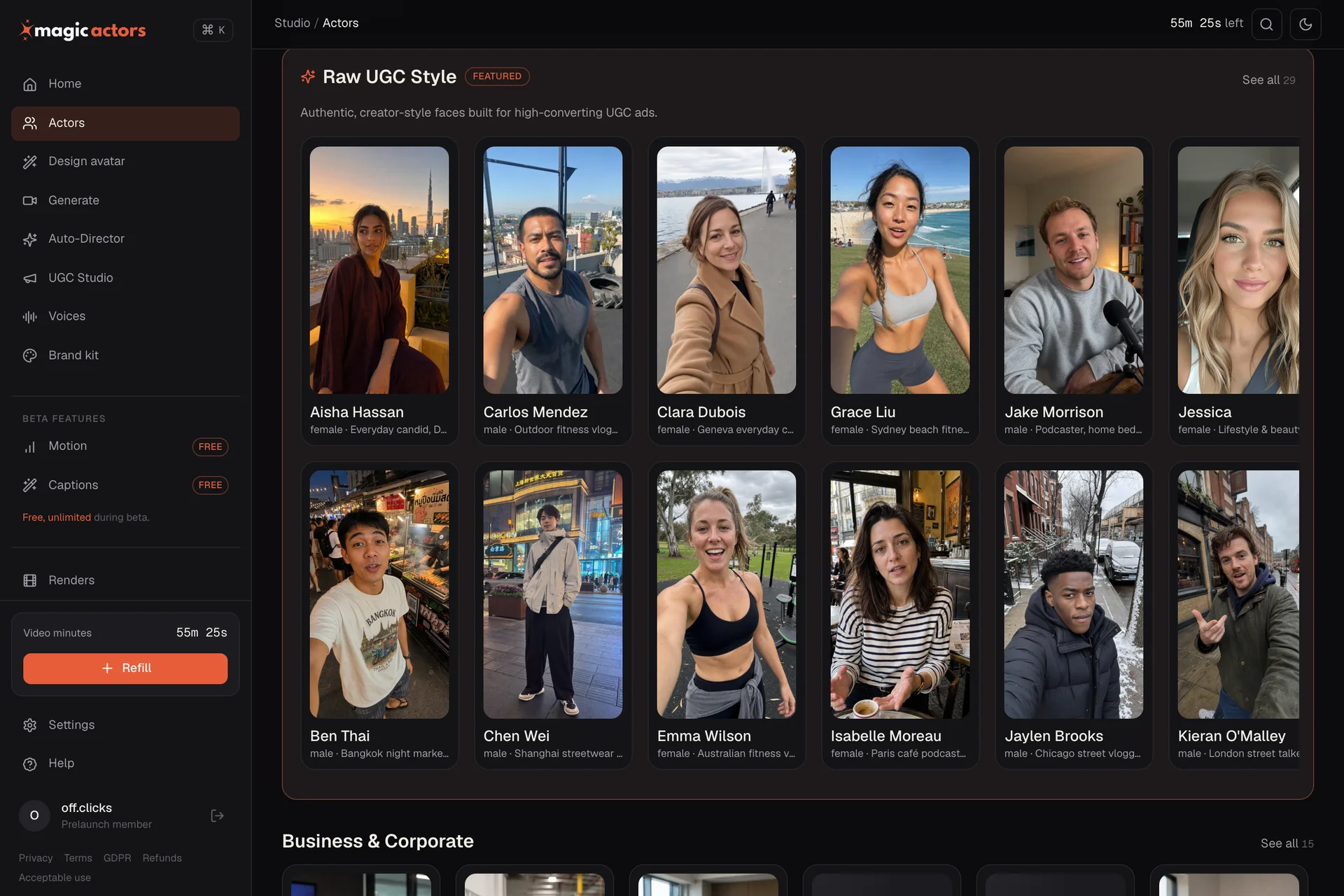
Choose your starting point
An AI UGC video generator uses a synthetic presenter, voice, or scene to create the style of creator-recorded content. That style does not make the result a real customer review.
Start with an AI actor and your dialogue. Use this route when your product facts and message are already approved.
Prepare: one hook, one product detail, and one next action.
MagicActors' Auto-Director uses a product URL to help develop the script, casting, and scenes. Review the proposed direction before rendering.
Prepare: a public product page with accurate features and a current offer.
Use the product-photo workflow to compose your product into an actor's scene. Compare the generated item with the original before using the clip.
Prepare: a clear product image and the details that must stay unchanged.
These are documented product workflows, not results from a new hands-on test. Available settings depend on the workflow you select.
One face. Different scenes.
AI twins & custom avatars
Upload your own image to MagicActors and create a digital twin based on your likeness. Use your AI twin to present product messages and UGC-style scripts without filming yourself for every new video.
Start with a clear selfie, create your AI twin, and choose the scene and dialogue for your video. This gives founders and creators a way to put their own likeness into product introductions, explainers, and talking-head clips.
Want a presenter designed for your brand? Describe the look and setting you want to generate a custom AI actor. Create unlimited AI avatar images to explore different looks and settings, then use your chosen avatar in UGC videos.
Choose your twin or custom actor, add your approved dialogue, and generate the video. Review the likeness, delivery, and product details before publishing.
Explore AI twin and custom-avatar creation on the MagicActors offer page. Video generation uses your plan's allowance.
Product image → presenter scene
A product photo tells the generator what the item looks like. Your direction tells it how the actor should present it: hold the bottle upright, keep the label facing the camera, or introduce it on a desk.
The adjacent images are existing MagicActors promotional assets. They illustrate the intended composition; they are not a documented before-and-after test from this page.
Only need product motion, without a presenter? See the image-to-video workflow.
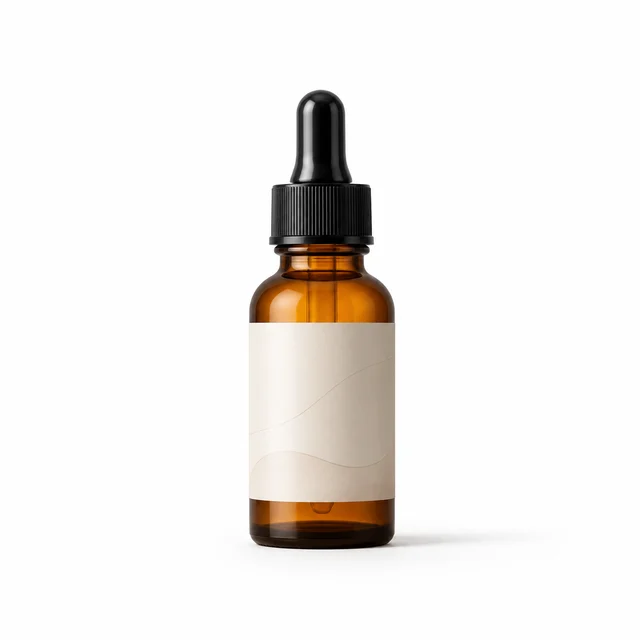 Product reference
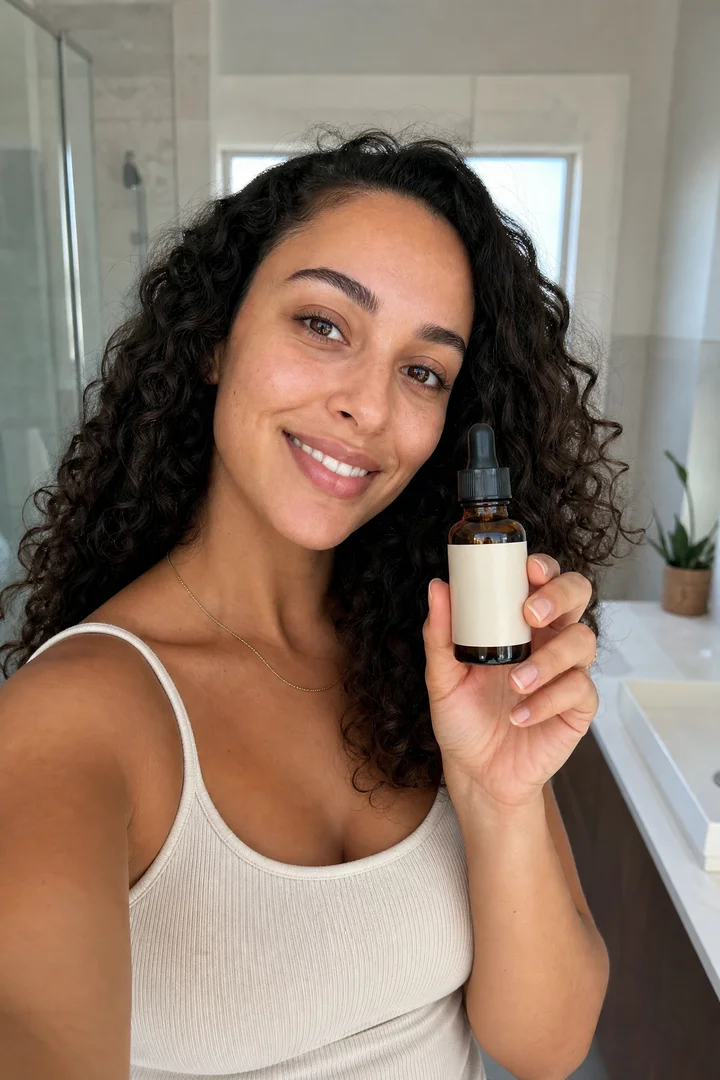 Presenter scene illustration
A worked creative brief
Sell a specific feature the viewer can inspect. Here is an illustrative plan for a fictional three-compartment desk organiser, aimed at people working at a small desk.
Input: product photo, verified compartment count, dimensions, and product-page link.
Angle: give pens, charging cables, and small accessories separate places.
Boundary: no invented customer experience, productivity result, or promise that every charger fits.
| Beat | Actor dialogue | Visual direction and review |
|---|---|---|
| Hook | “Pens and charging cables sharing the same pile?” | Open on a small desk. Keep the scene familiar; do not invent a customer story. |
| Product detail | “This organiser has three compartments, so each has a place.” | Show the actual three-compartment layout. Reject an output that changes the divider count. |
| Fit | “Check the dimensions against your desk and the things you want to store.” | Use a real product close-up or verified size graphic if precise fit matters. |
| Action | “See the measurements and colours on the product page.” | End with the real product and a next step the destination fulfils. |
Try “A small desk needs a home for the little things” or “Where do your cables go after you unplug them?” Keep the actor, body, offer, and destination the same so the opening is the main creative difference.
Compare landing-page visits and purchases alongside viewing data. A hook that holds attention can still attract the wrong buyer. Treat low-volume results as provisional.
From brief to reviewed video
Prepare the product facts before generating. Then use the MagicActors route that matches your starting material.
Select a presenter and setting that suit the product. Decide where the video will run before choosing its framing.
Use your approved script, a product URL for Auto-Director, or a product photo for a product scene. Remove unsupported claims from any suggested script.
Review the direction and any displayed generation cost. Keep the first version focused enough that you can spot which part needs changing.
Watch with sound and without it. Check the product, pronunciation, on-screen text, and ending. Revise the failed part before publishing.
Explore new presenter looks and scenes before choosing the image for your next video.
Try different hooks, scripts, and deliveries to find the voiceover that fits your message.
Add captions to your videos so viewers can follow the message with the sound off. Review the wording and timing before publishing.
These creator tools are included with paid access. Image and voiceover generation are subject to fair use. Generating new AI video still uses your video allowance.
For more help with the creative sequence, read how to write and structure an AI UGC video.
Free production brief
Replace the bracketed fields with facts about your product. Use this as a planning document, then move the relevant dialogue and visual direction into your chosen workflow.
Product: [name and product-page URL]
Viewer: [who this is for and the situation they recognise]
One useful feature: [a verified product fact]
Evidence: [photo, specification, or real demonstration]
Hook: [one sentence about the viewer's situation]
Actor dialogue: [feature, why it matters, next action]
Visual direction: [setting, framing, one product action]
Keep unchanged: [label, shape, colour, dimensions]
Do not claim: [unsupported results or personal experience]
Destination: [the page that fulfils the call to action]
Final review: [product accuracy, voice, text, claims]
A usable output needs a review
Judge the output against your source material, not just whether the actor looks convincing.
| Check | Reject or revise when… | Next action |
|---|---|---|
| Product identity | The label, pack shape, colour, or number of parts changes. | Simplify the action, improve the reference, or replace the shot with real product footage. |
| Hands and interaction | Fingers pass through the item, the grip changes, or the action is physically implausible. | Use a simpler hold or a separate product close-up. |
| Voice and timing | The brand name is wrong, words are missing, or the mouth and speech drift apart. | Adjust the dialogue or pronunciation and review a new take. |
| Text and framing | Captions cover the product, text is unreadable, or the final placement crops the call to action. | Preview at phone size in the intended placement and correct the layout. |
| Claims and experience | The actor claims to have bought, tested, or benefited from a product without a real basis. | Rewrite as a factual product explanation. Use a real customer's own account when customer experience is the evidence. |
Cost and access
MagicActors video generation is paid. The brief on this page is free to use and download. Paid access includes unlimited AI avatar images, unlimited voiceovers, and captioning for unlimited videos. Image and voiceover generation are subject to fair use; generating new AI video uses your plan's video allowance.
Check the current offer for the price, included video allowance, available workflows, top-up costs, expiry, and refund conditions. Successful attempts you decide not to publish can still consume your allowance.
No. Real user-generated content comes from a person describing or showing their own experience. AI UGC recreates a creator-style presentation using generated elements. Use it for a clearly presented product message; the actor's appearance is not evidence of customer experience.
MagicActors offers a workflow for placing a product photo into an actor's scene. A generated scene can illustrate how you want to present the item, but it cannot establish that a physical feature works. Use a real demonstration for claims about fit, strength, results, or performance.
You can use MagicActors' AI actor roster or create a custom avatar without appearing on camera. To use your own likeness, upload a selfie and create an AI twin for your UGC videos. You do not need to film yourself for every new script.
The MagicActors sales page advertises commercial use for ads and client work. Check its current terms and the rights to your uploaded images, voices, music, and scripts before publishing.
Generation happens in MagicActors. This HypeVideo page helps you prepare and evaluate the video; the MagicActors links take you to its offer page so you can review access before proceeding.
Published by HypeVideo to help readers use our MagicActors product. Product descriptions and promotional images were checked against the MagicActors sales page on . The desk-organiser brief and review checklist are editorial examples, not a hands-on benchmark or customer results.
Your next video
Choose your AI actor, create your digital twin, or design a custom avatar. Bring your script to MagicActors and start creating.
Unlimited AI avatar images. Unlimited voiceovers. Caption unlimited videos.
Get 20% bonus credits with promo code HYPEVIDEO.
To claim your bonus credits, email support@magicactors.com with the code HYPEVIDEO and your MagicActors account email.